Mesh WiFi vs WiFi Extender: Which Solution to Cover the Whole House?
Contents
Your WiFi doesn't cover every room? Thick walls, multiple floors, garden — the causes are numerous. Two solutions dominate the market: the Mesh WiFi network and the WiFi Extender / Repeater. This guide compares both approaches and explains why the fiber backbone + WiFi remains the most powerful solution for large homes.
Mesh WiFi and WiFi Extender: what are we talking about?
Mesh WiFi (mesh network)
A Mesh WiFi network replaces your existing network with a mesh system made up of several nodes: a main router and satellites. All nodes communicate with each other and create a single network with one name (SSID). Your devices automatically switch to the nearest node with no interruption — this is seamless roaming.
- A single SSID for the whole house
- Automatic roaming (802.11r/k/v protocols)
- Uniform coverage even across large areas
- Self-optimization of network paths between nodes
The WiFi Extender (repeater)
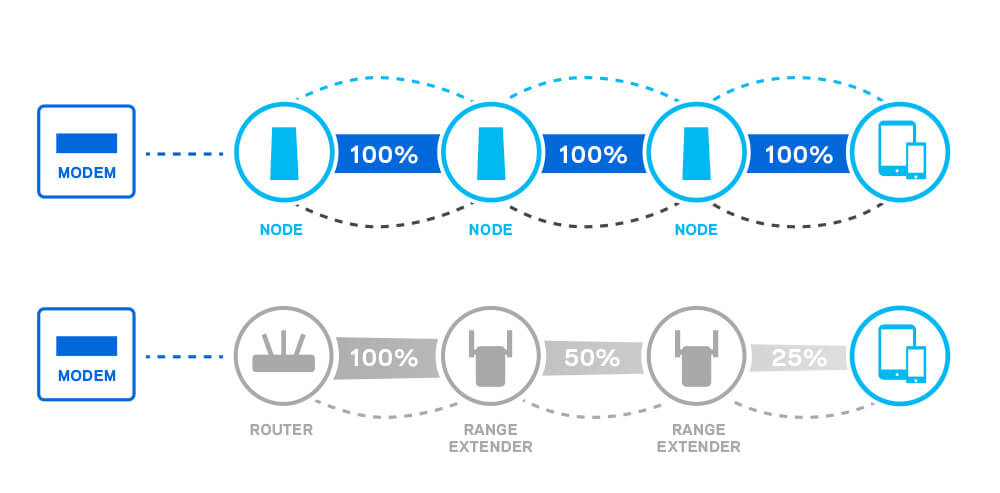
A WiFi Extender plugs into a wall socket and rebroadcasts the signal from your existing router. It often creates a second network (mynetwork_EXT) and halves the throughput because it uses the same channel to receive and retransmit.
- Two SSIDs (main network + "_EXT")
- No roaming — manual switching between networks
- Throughput halved (half-duplex operation)
- Ultra-simple installation (plug into a socket)
Comparison table: Mesh WiFi vs Extender
| Criterion | Mesh WiFi | WiFi Extender |
|---|---|---|
| Coverage | Whole house (multi-node) | Limited area around the repeater |
| SSID | One unified network | Two networks (main + _EXT) |
| Roaming | Automatic and seamless | Manual — switch networks |
| Throughput | Maintained (dedicated backhaul) | Halved (half-duplex) |
| Latency | Low | High (double hop) |
| Multi-device | Excellent handling | Quick congestion |
| Installation | Guided mobile app | Very simple (wall socket) |
| Scalability | Add more nodes | 1 repeater per area |
| Price | Higher (2-3 node kit) | Cheaper (single unit) |
| Ideal for | Homes > 80 m², multi-floor | Small apartment, 1 dead zone |
4 concrete advantages of Mesh WiFi
1. Easier deployment in the long run
The repeater is faster to install, but the mesh is easier to manage over time: a single app, a single network, adding nodes in minutes. No reconfiguration when you change your ISP box.
2. Seamless roaming
With an extender, your phone stays clinging to the main network even when you're closer to the repeater. The mesh uses the 802.11r/k/v protocols to switch automatically — no drops during video calls or streaming.
3. Maintained throughput
A repeater halves the throughput because it uses the same channel to receive and retransmit. A tri-band mesh or one with a wired backhaul (Ethernet or fiber) maintains full throughput at each node.
4. Ready for WiFi 7
The WiFi 7 (802.11be) standard with Multi-Link Operation (MLO) is designed for mesh. The 320 MHz channels and tri-band aggregation will deliver unprecedented performance. See our Intel BE200 PCIe WiFi 7 card.
The ultimate solution: fiber backbone + WiFi
Mesh WiFi solves the coverage problem, but the throughput between nodes remains limited by wireless. The professional solution: connect each WiFi access point with an Ethernet cable or a fiber optic link. This is the wired backbone.
The wired backbone eliminates throughput loss between nodes. Each WiFi AP receives 100% of the source throughput — no division, no degradation.
Elfcam products for a fiber + WiFi backbone
- Fiber converters — point-to-point link, built-in SFP, pack of 2
- Fiber optic cables — SC/APC patch cords to connect the converters
- PoE switches — power your WiFi APs without a wall outlet
- 10G switches — multi-gig backbone for Freebox Ultra and NAS
- CAT 6/7/8 Ethernet cables — high-speed RJ45 link
- SFP/SFP+ modules — for fiber switches and converters
For a complete deployment guide, check our page Home Fiber — home fiber network.
When to choose what?
- Small apartment (< 60 m²)
- 1 single dead zone
- Minimal budget
- Home > 80 m²
- Multi-floor
- Connected family (10+ devices)
- Large home (> 150 m²)
- Maximum performance
- NAS, 4K/8K streaming, gaming
Tip
Whatever your choice (mesh or wired AP), use an Ethernet or fiber backhaul rather than wireless between nodes. This is the factor that makes the biggest performance difference.

















